Panda CSS 2.0
We rewrote the Panda compiler in Rust. Same styling API, a new engine underneath, and the features that rewrite made possible.


Today we're releasing Panda CSS 2.0.
It's the biggest change we've made to Panda since we first launched it, but if you're already using Panda, something might surprise you: the way you write Panda hasn't really changed.
You still use the same css() function, the same recipes and patterns. Your tokens, conditions, and JSX style props
also work the same way.
What changed is the engine doing all the work underneath.
For Panda 2.0, we've replaced the compiler with a new engine written in Rust, built on Oxc.
Take a look at the difference:
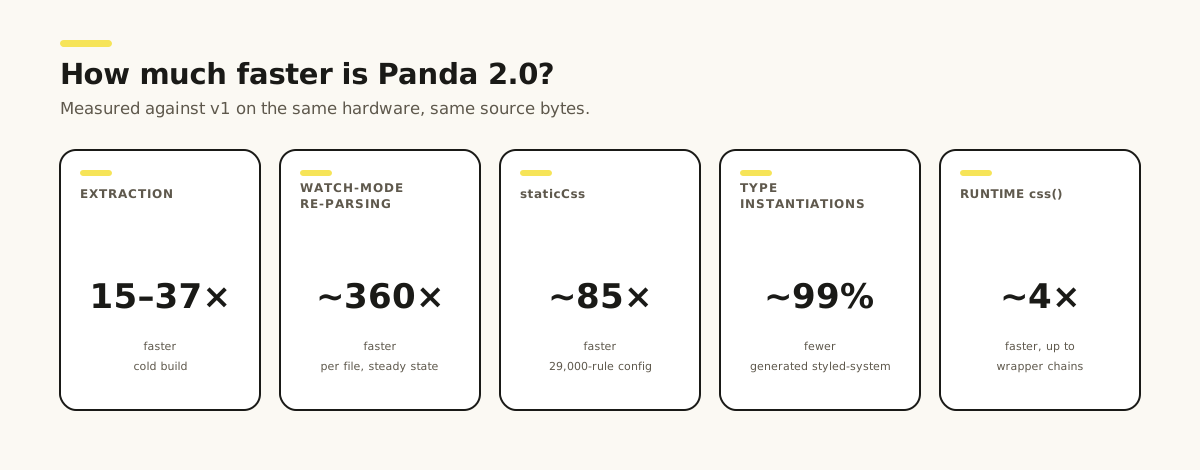
- 15–37× faster extraction, and watch-mode re-parsing on the order of 360× faster.
- staticCss builds about 85× faster, from 25.7 s to 0.3 s on a 29,000-rule config.
- ~99% fewer TypeScript type instantiations on your generated types, for a lighter editor and CI.
- Design systems you can publish:
panda libto author,designSystemto consume, with no re-extraction in the consuming app. - New in the box: new styled-system factories (
viewTransition(),firstThatWorks(),keyframes(),positionTry()), mask and scrollbar utilities,@property-registered variables, a first-party ESLint plugin, a typography preset, and a rebuilt CLI. - ESM-only, needs Node 22 or newer.
Over the rest of this post, we'll walk you through why we decided to rewrite the compiler, what changed in terms of performance, how the new engine works and everything you need to know to upgrade.
Why we rewrote the engine
Panda's original engine was built around TypeScript analysis running in Node. We used ts-morph, a wrapper around the full TypeScript compiler, for extraction and a JavaScript interpreter to evaluate constant values.

That worked well for v1, but it came with costs that grew alongside your project. As we started thinking about v2, there were a few things we wanted to improve:
- Reduce system memory usage
- Run the same engine everywhere
- Make the compiler significantly faster, especially on large projects
- Make it easier to build design systems
- Make Panda work better in monorepos
From Node to Rust
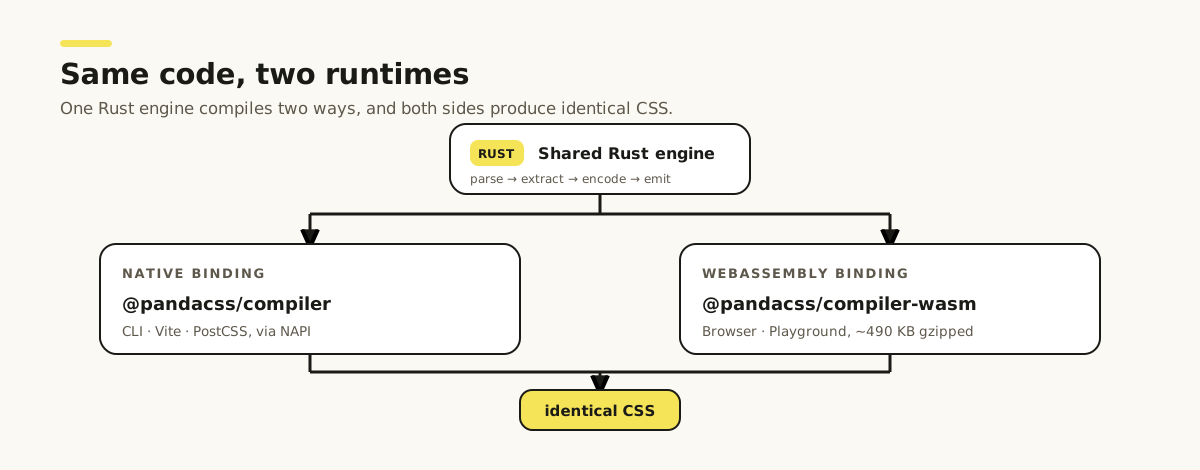
We rebuilt Panda's hot path in Rust on top of Oxc, a fast JavaScript toolchain written in Rust. The engine has two thin bindings:
- a native binding for the CLI and bundlers
- a WebAssembly binding for the browser
| Binding | Package | Runs in |
|---|---|---|
| Native (NAPI) | @pandacss/compiler | CLI, Vite, PostCSS |
| WebAssembly | @pandacss/compiler-wasm (~490 KB gzipped) | Browser, playground |
Inside the new engine
The v2 engine follows a simple one-way pipeline: extract → encode → emit. Your source files flow in, Panda collects
the atomic style rules it needs, and a stylesheet flows out. Each stage is its own Rust crate that knows nothing about
the stages around it.
Here's what happens to your code on the way through.
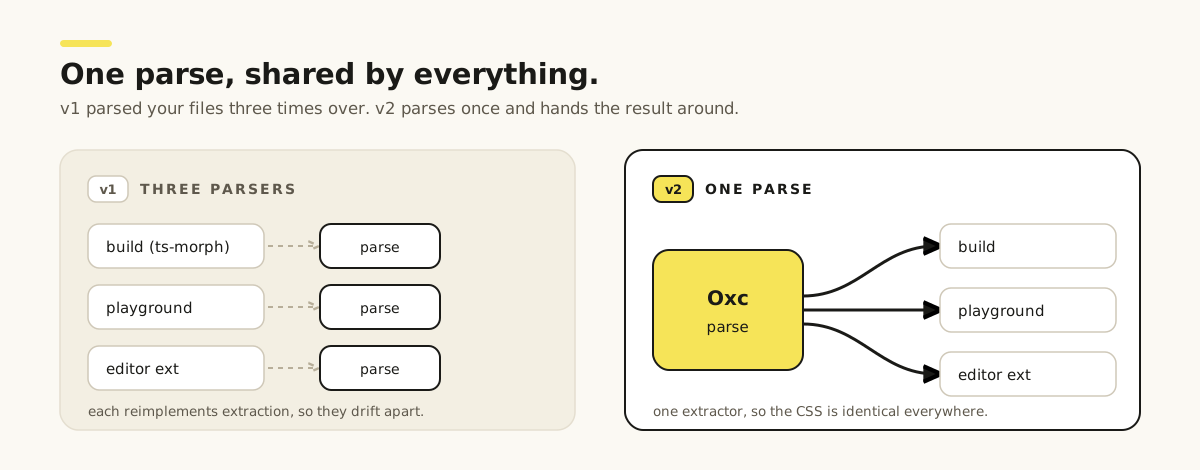
One parse per file
In v1, several tools parsed the same files separately. In v2, Oxc parses each file once, and that single parse is shared
across imports, css() calls, JSX, and identifier resolution.
The engine also checks imports first. If a file doesn't use Panda, it skips it entirely. This is especially useful for
node_modules files that never touch Panda, and is one of the reasons cold builds are faster.
Improved value resolution
The old engine used a JavaScript interpreter to resolve constant expressions. In v2, Panda does this directly in Rust,
resolving more values at build time, including imports, operators, ternaries, enums, and token() references, while
keeping the same CSS output.
const spacing = { sm: '8px', lg: '24px' }
const scale = 2

css({
  padding: spacing.lg, // object member → '24px'
  margin: `${4 * scale}px`, // template + arithmetic → '8px'
  gap: cond ? spacing.sm : '0' // both branches extracted
})
Cross-file resolution
Panda resolves values across files too. If a value is imported from another file, Panda parses that file once, folds the value you're using, and keeps a small descriptor instead of holding the whole file in memory.
// theme.ts
export const brand = '#4f46e5'

// Card.tsx
import { brand } from './theme'

css({ borderColor: brand }) // → '#4f46e5'
Better CSS output
The old pipeline handed generation to PostCSS. v2 emits CSS natively in a dedicated crate. It does the CSS-aware work that matters for output quality:
Modern breakpoints - Responsive conditions now use CSS media-range syntax, like @media (width >= 48rem), instead
of min-width/max-width. Container queries use the same approach with inline-size.
@media (min-width: 48rem) {
  .fs_lg {
    font-size: 1.125rem;
  }
}
@media (min-width: 48rem) {
  .fw_bold {
    font-weight: 700;
  }
}
into this:
@media (width >= 48rem) {
  .fs_lg {
    font-size: 1.125rem;
  }
  .fw_bold {
    font-weight: 700;
  }
}
Deterministic cascade order - Output is sorted into Panda's layers (reset, base, tokens, recipes, utilities), with
a stable ordering within each so shorthands rank below longhands and the cascade is predictable across builds.
css({ paddingTop: '4px', padding: '8px' })@layer reset, base, tokens, recipes, utilities;
@layer utilities {
.p_8px {
padding: 8px;
}
.pt_4px {
padding-top: 4px;
}
}Even though paddingTop comes first in the source, padding is emitted first and paddingTop after it.
Cleaner global variables - CSS variables now use the @property, so defaults are only generated when the variable
is actually used.
/* v1: seeded on every element, whether it's used or not */
*,
::before,
::after,
::backdrop {
  --backdrop-blur: ;
  /* …and 33 more */
}
into this:
/* v2: registered once, shipped only when something uses it */
@property --backdrop-blur {
  syntax: '*';
  inherits: false;
}
One engine for Node and browser
The engine compiles two ways: a native binding (@pandacss/compiler) for the CLI and bundlers, and a ~490 KB
WebAssembly binding (@pandacss/compiler-wasm) for the browser. See
how it works.
How much faster is Panda 2.0?
One of the biggest reasons for rewriting the engine was performance. So, how much faster is v2?
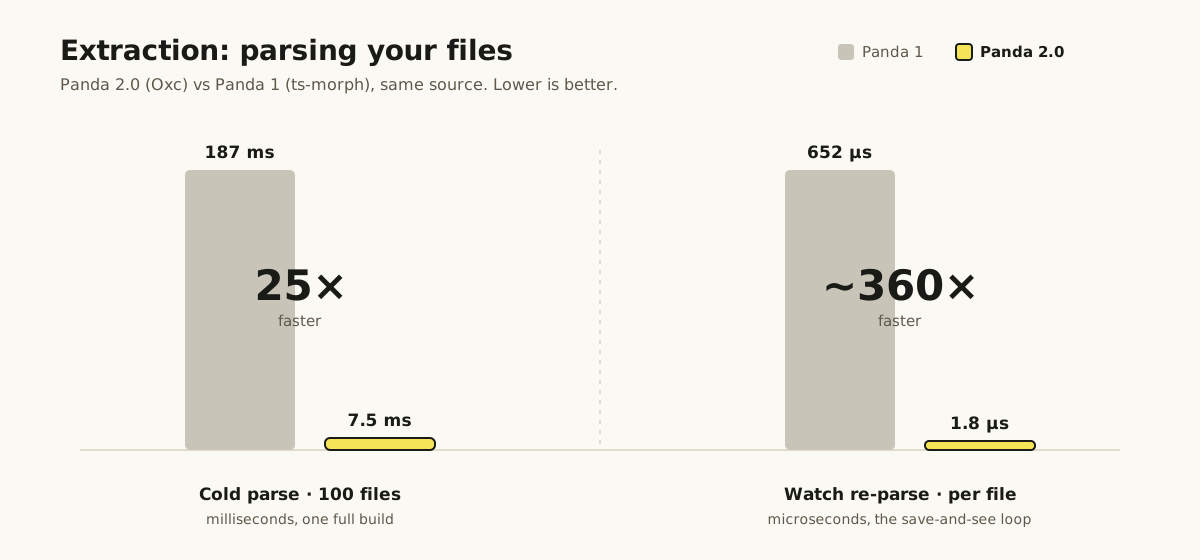
Extraction is 15–37× faster
Extraction is the core of what the rewrite replaced: parsing your files and pulling out the styles. Across fixtures from a handful of files up to a synthetic thousand-file project, the Oxc engine runs a cold extraction 15 to 37 times faster than the ts-morph engine.
Watch mode is ~360× faster
When you save a file, Panda now re-parses it with Oxc instead of the TypeScript compiler. That dropped re-parsing from around 650 microseconds per file to under 2, roughly 360–390× faster. In a Next.js project, the parse step dropped from 762 ms to 31 ms.
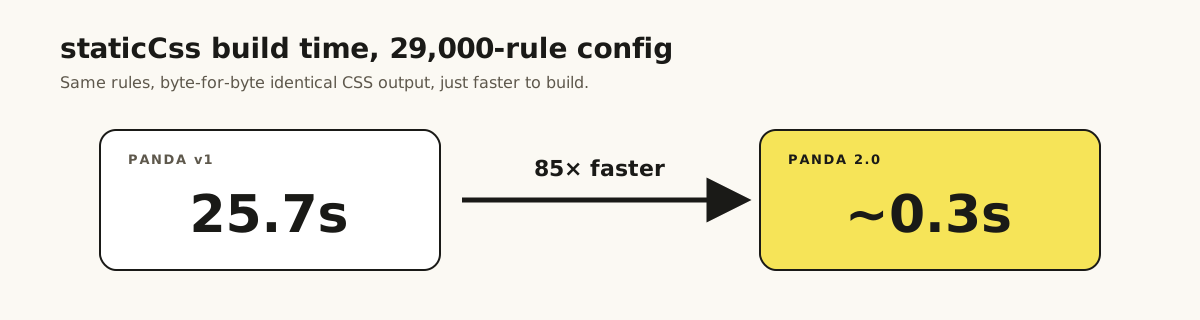
staticCss is ~85× faster
staticCss was one of the more expensive things you could ask Panda v1 to do. On a config generating around 29,000
rules, build time dropped from 25.7 seconds to ~0.3 seconds. That's roughly 85× faster!
Generated types are lighter
We also changed the type graph Panda generates for styled-system, which means less work for TypeScript and, in turn, your editor and CI.
- ~99% fewer type instantiations
- ~21–25% less memory in
tsc - 40–60% less type-check time
Type-checking the generated styled-system types shows the same pattern across all four fixtures:
| Fixture | Type instantiations (v1 → v2) | tsc memory (v1 → v2) | Check time (v1 → v2) |
|---|---|---|---|
| small | 2,603 → 20 | 85 MB → 64 MB | 50 ms → 30 ms |
| medium | 2,639 → 20 | 82 MB → 65 MB | 50 ms → 20 ms |
| large | 2,648 → 20 | 87 MB → 65 MB | 50 ms → 20 ms |
| strict | 2,575 → 26 | 82 MB → 64 MB | 50 ms → 20 ms |
In v2, native CSS properties share one conditional-value type instead of generating their own, which keeps the count almost flat even as the fixture grows.
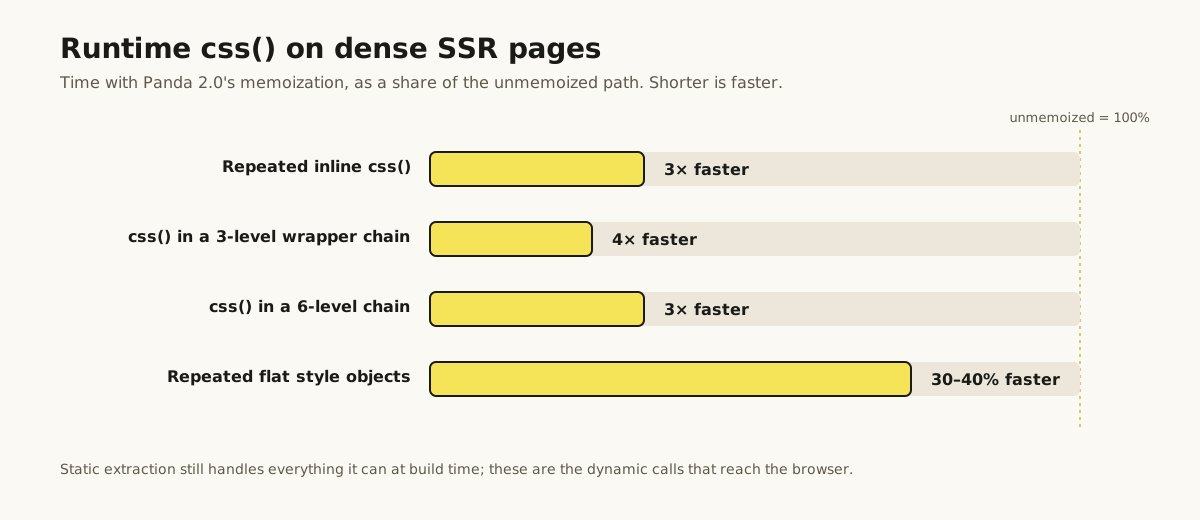
Runtime is ~4× faster
Not all of Panda's work happens at build time. For styles that need to be resolved at runtime, v2 adds memoization to
css() and recipes, so repeated styles don't have to do the same work again.
New features in v2
The new engine is a big part of Panda 2.0, but there's quite a bit more in this release.
Let's go through the bigger additions:
Publishable design systems
In v2, you can now build a Panda design system, publish it as an npm package, and use it in another Panda project without that project having to extract all of its styles again.
Previously, sharing a Panda component library meant configuring presets, importMap, and include in the consuming
app. The app also had to scan the library's source during its own build.
Run the command:
panda libPanda packages the design system's config and syncs the package's exports for you.
Then, in the consuming app, set this field:
export default defineConfig({
  designSystem: '@acme/ds'
})
A few things make this approach an enjoyable user experience:
- You customize without forking
- Works across different setups
- Design systems can extend each other
- You get better errors when something goes wrong
- Ship only what you use
View transitions
We've added a new viewTransition() function for working with the View Transitions API. You can define how an element
transitions between its old and new state directly from your styled system:
import { viewTransition } from 'styled-system/css'

const slide = viewTransition({
  group: { animationDuration: '0.4s' },
  old: { opacity: 0 },
  new: { opacity: 1 }
})
You can also name reusable transitions in your theme so a preset can share them, and viewTransition('slide') inlines
the shared class. Unused named transitions stay out of your CSS.
Ordered value fallbacks
firstThatWorks() ships a modern CSS value with a fallback for the browsers that don't support it yet. Write the value
you want first, the same order as StyleX, and Panda emits both declarations in the order CSS needs:
import { css, firstThatWorks } from 'styled-system/css'

css({
  color: firstThatWorks('oklch(55% 0.18 250)', '#0057b8'),
  minHeight: firstThatWorks('100dvh', '100vh')
})
Each fallback is typed by the property it sits in, so members autocomplete and strictTokens checks each one — under
strictTokens an arbitrary value takes the usual bracket escape,
firstThatWorks('[oklch(55% 0.18 250)]', '[#0057b8]'). It covers what you used to write by hand — a wide-gamut color
with an sRGB fallback, 100dvh behind 100vh, or a vendor-prefixed value like -webkit-sticky.
Local keyframes and anchor fallbacks
Two more factories follow the same shape as viewTransition(): a component-local block that emits its own at-rule and
is tree-shaken to what your build actually references.
keyframes() defines an animation next to the component that uses it, rather than in theme.keyframes:
import { css, keyframes } from 'styled-system/css'

const fade = keyframes({ from: { opacity: 0 }, to: { opacity: 1 } })

css({ animation: `${fade} 0.2s ease-in` })
positionTry() names a CSS anchor-positioning fallback and returns the ident for positionTryFallbacks, emitting the
@position-try block for you:
import { css, positionTry } from 'styled-system/css'

const fallback = positionTry({ top: 'anchor(bottom)' })

css({ positionTryFallbacks: fallback })
Shared animations still belong in theme.keyframes, and shared fallbacks in the new theme.positionTry.
globalPositionTry is gone — move its entries to theme.positionTry and reference them through the factory.
New base-preset utilities
The base preset now includes utilities for CSS you previously had to write by hand.
Masking lets you create edge fades and radial masks directly from Panda:
css({ maskBottomFrom: '50%' })
css({ maskRadialFrom: '35%', maskRadialAt: 'center' })
Scrollbars can now be styled with separate thumb and track properties:
css({ scrollbarThumb: 'gray.400', scrollbarTrack: 'gray.100' })Note that scrollbarWidth now takes the CSS keywords auto | thin | none instead of a size token.
We've also added new conditions like _pointerFine, _pointerCoarse, _anyPointer*, _userValid, _userInvalid, and
_inert along with more text-wrap values.
rotateX, rotateY, and rotateZ have also been fixed, with better composition between rotation and non-uniform
scaling.
Variables via @property
v1 seeded 34 CSS variables on *, ::before, ::after, ::backdrop so that things like transforms and filters had
defaults. That's a lot of declarations on every element whether you used them or not.
v2 registers those variables with @property, so defaults are only generated when they're actually needed. Utilities
can also register their own variables.
A better CLI
We've cleaned up the CLI and added a few new tools. Running panda now handles both codegen and CSS generation.
panda doctorcombinesinspect,validate, andinfointo one project health check.panda analyzeshows how tokens and styles are being used across your project.panda debuggenerates the project information and extraction details you need for debugging or reporting an issue.--profilecreates a performance profile that includes time spent inside the Rust engine.--includelets you override your source globs for a single run.panda init -igives you an interactive setup flow and now scaffolds the base presets by default.
Logging has also been simplified to a single --log-level option.
ESLint plugin
Panda 2.0 now has an official ESLint plugin that uses the same extraction engine as your build.
// eslint.config.js
import panda from '@pandacss/eslint-plugin'

export default [panda.configs.recommended]
You get rules like no-invalid-token-paths, no-hardcoded-color via prefer-token, no-shorthand-longhand-mix,
no-deprecated, and an autofixing consistent-property-style, plus opt-in rules like no-primitive-token (nudges you
toward semantic tokens when a matching category exists) and no-descendant-selectors (keeps every style scoped to its
own element). The same rules run under oxlint through a dedicated entry point.
Typed config helpers
defineConditions and definePositionTry join defineTokens, defineRecipe, and friends, so custom conditions and
anchor fallbacks get the same autocomplete and type-checking when you author them outside defineConfig.
A typography preset
The new @pandacss/preset-typography package gives you a prose recipe for styling content you don't directly control,
like Markdown or CMS-rendered HTML.
import typography from '@pandacss/preset-typography'

export default defineConfig({
  presets: [typography()]
})
The Typography guide covers more details.
Codegen and type fixes
Keyframe names now work with strictTokens without escape-hatch brackets, native CSS values keep their autocomplete
when a token category is empty, and CSS keywords like cursor: "pointer" work as expected under strictTokens.
MCP and plugins
The MCP server is now its own package:
run npx -y @pandacss/mcp
The compiler reads .vue, .svelte, and .astro files directly, so you no longer need @pandacss/plugin-vue or
@pandacss/plugin-svelte.
Panda now ships bundler plugins for Vite, webpack, Rollup, and Bun (@pandacss/vite, @pandacss/webpack,
@pandacss/rollup, @pandacss/bun). Turn on transform: true and they rewrite static css(), recipe, and pattern
calls into class strings, so the styling runtime drops out of your bundle. See
Source transforms.
Upgrading from v1
Your panda.config.ts carries over. The panda and pandacss binaries are unchanged, panda build still runs codegen
and CSS generation in one pass, and the CSS you get out stays in parity — except for a short list of deliberate changes
below. Install it with @pandacss/dev@latest. All @pandacss/* packages move on one version, so don't mix a v1 package
with a v2 one.
Panda is now ESM-only
v2 needs Node 22 or newer and an ESM project. Set "type": "module" in your package.json and convert any CommonJS
config.
// Before
const { defineConfig } = require('@pandacss/dev')
// After
import { defineConfig } from '@pandacss/dev'
Your postcss.config.cjs stays CommonJS on purpose — that's the one file Next.js still expects in CJS, and it keeps
working.
Hooks moved to plugins
Root-level hooks moved into plugins, each with a filter and a handler.
// Before
export default defineConfig({
  hooks: { 'cssgen:done': ({ content }) => content }
})
// After
export default defineConfig({
  plugins: [
    {
      name: 'local',
      hooks: { 'parser:before': { filter, handler } }
    }
  ]
})
cssgen:done is observe-only now — you can read the generated CSS but not rewrite the string. The engine-internal hooks
(context:created, parser:after, tokens:created, utility:created, and the rest) are gone.
createStyleContext split
// Before
const ctx = createStyleContext(recipe)
// After — slot recipe (sva)
const ctx = createSlotRecipeContext(recipe)
// After — single recipe (cva)
const ctx = createRecipeContext(recipe)
There's a new withRootProvider for a slot root that renders no slot of its own.
Matching JSX with data
v1 let you match custom JSX components with a matchTag callback — a JavaScript function Panda ran for every element.
That can't cross into a Rust or WebAssembly engine, so v2 replaces it with jsxMatchTag, a declarative rule list
matched by component name, a pattern, or the module a component is imported from:
export default defineConfig({
  jsxMatchTag: [{ tag: /^(Flex|Stack|Box)$/ }, { from: '@acme/ui', props: ['padding', 'color'] }]
})
Rules are evaluated last-match-wins over Panda's own detection, and because it's data rather than code, it works identically in the CLI and in the browser.
Removed config options
Nine options are gone: studio, eject, emitTokensOnly, gitignore, clean, watch, poll, lightningcss, and
browserslist. forceConsistentTypeExtension became forceImportExtension (different semantics, not a rename), and
outExtension now also accepts 'ts'.
The syntax option and the template-literal authoring mode are also removed. Drop syntax from your config and the
--syntax flag from panda init, and write styles with the object form — css({ color: 'red' }) instead of
css`color: red`.
CLI commands consolidated
panda inspect, panda validate, and panda info are now one command: panda doctor (pass --json for scripts). The
--silent / --quiet / --verbose flags became a single --log-level silent|error|warn|info|debug, and --cpu-prof
became --profile (which now covers Rust engine time too). Shared flags are kebab-case.
panda ship is gone, replaced by the design-system flow — panda lib to author, designSystem to consume. More on
that below.
Internal packages folded in
If you imported @pandacss/core, /extractor, /generator, /node, /parser, /token-dictionary, /is-valid-prop,
/logger, or /reporter directly, drop those imports — they're internal to the compiler now. If you only use
@pandacss/dev with Vite or PostCSS, nothing changes. MCP moved to its own package: run npx -y @pandacss/mcp instead
of panda mcp.
A few CSS output changes
These are intentional and worth knowing about before you diff your output:
-
sizes.proseis narrower.@pandacss/preset-pandachanges it from65chto60ch. Override the token to keep the v1 width; see Upgrading to v2. -
Border overrides sort by property, not source order. All border shorthands now sit in one tier and all-sides wins. When an override must win, use the longhand —
borderInlineEndWidth: '0'ranks above every shorthand. Padding, margin, and the other directional shorthands sort the same way. -
No universal variable reset. v1 seeded 34 declarations on
*, ::before, ::after, ::backdrop. v2 registers them with@property, so they ship only when used. That needs@propertysupport (Chrome 85+, Safari 16.4+, Firefox 128+); setoptimize.propertyFallback: trueto also seed plain-declaration defaults for older browsers. -
scrollbarWidthtakes keywords now (auto | thin | none), not a token. A singlescrollbarColorvalue moves toscrollbarThumb.
Migrating gradually
The one surprise nobody expects is layering. Panda ships its CSS inside @layer, and per the CSS spec, any unlayered
rule beats every layered rule, so your legacy, unlayered styles win over converted Panda components by default. If
you're migrating incrementally, either run postcss-cascade-layers to strip the layer wrapper (so Panda competes as
unlayered too), or hold a clean boundary by route, directory, or team.
Cascade layers covers the details.
Try it
npm install @pandacss/dev@latestThe full upgrade guide is in the docs, and the playground now runs the same engine in your browser. We built Panda 2.0 because we wanted a faster, smaller engine we could take everywhere: the CLI, your bundler, and the web. Your code doesn't have to know it happened. That's the point.